
In Pakistan, the National Jobs Portal (NJP Jobs) is the largest platform for getting government jobs. If you have not applied yet or you are having trouble logging in to NJP, this guide is for you.
How to Log in to NJP Jobs (Step by Step)
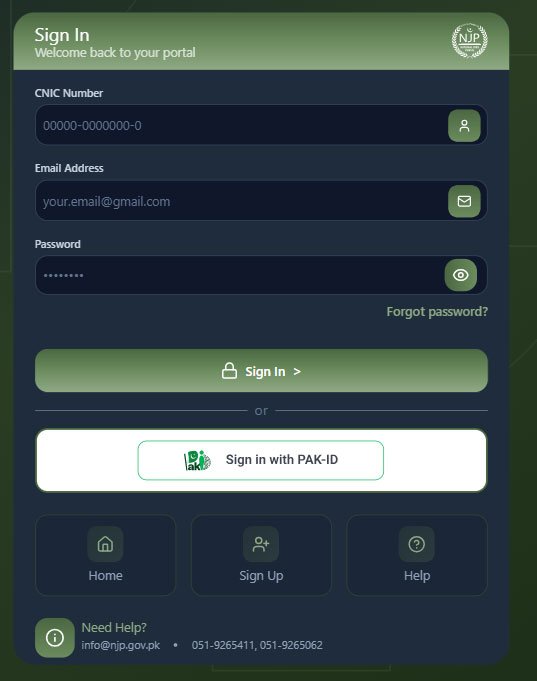
Follow these simple steps to log in to the NJP Jobs portal:
- Visit the Official Website: First, go to njp.gov.pk/login.
- Enter CNIC Number: Type your 13-digit CNIC number without dashes.
- Enter Email Address: Write the same email address you used during registration.
- Enter Password: Type your password and click on the “Login” button.
Forgot Your NJP Login Password? (Reset Process)
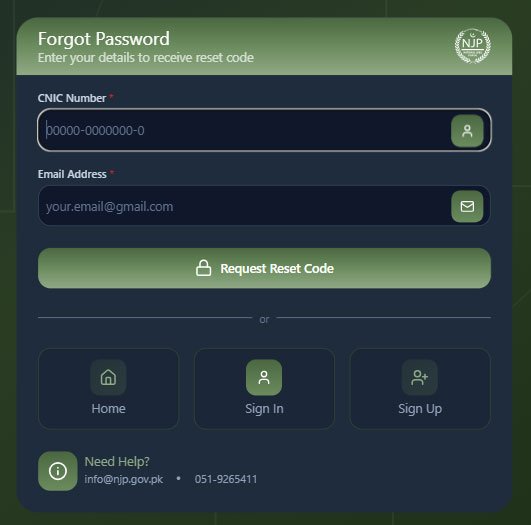
If you have forgotten your password, don’t worry. Follow these steps:
- On the login page, click on “Forgot Password.”
- Enter your registered CNIC number and email address.
- You will receive a reset link or code in your email. Use it to create a new password.
NJP Helpdesk Contact Details
Agar aapka NJP Login bar bar fail ho raha hai, to aap in se rabta kar sakte hain:
-
Phone: 051-9265411
-
Email: info@njp.gov.pk